
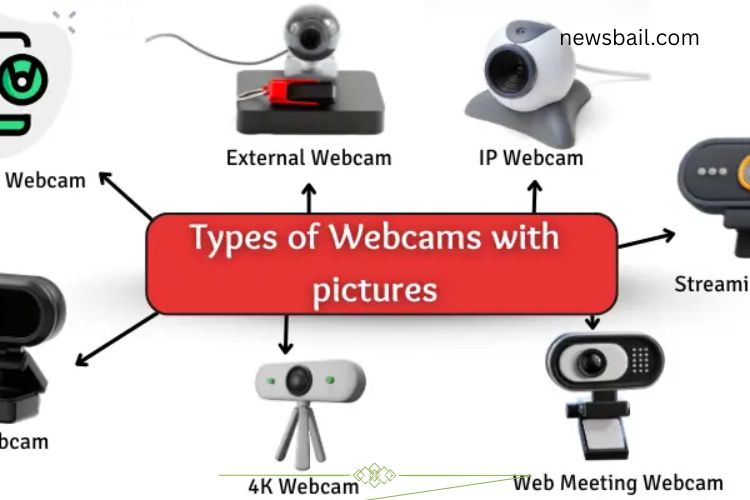
Video communication has become an essential part of our daily lives, whether for work, education, or entertainment. Poor video quality during online meetings or streaming can be frustrating and affect your presence online. Choosing the right webcam ensures clear video, smooth performance, and a professional look. With so many options available, understanding the different types of webcams is key. This guide will help you find the perfect webcam for your needs.
Read More: Discover the Ultimate Guide to Computer Monitors – Unlock Stunning Clarity and Peak Performance
Types of Webcams
Webcams are devices that capture visual data and transmit it to your computer or over the internet. They vary in design, quality, and purpose. Understanding the types of webcams can help you select one that fits your requirements.
Built-in Webcam
Built-in webcams are integrated into laptops or monitors. They activate automatically when you open a video application, capturing your image without the need for extra devices or cables.
Uses:
- Video calls with family, friends, or colleagues
- Online classes and tutorials
- Recording short videos
- Participating in meetings
- Facial recognition and unlocking devices
Advantages:
- Simple to use with no setup
- Saves desk space
- Always available and ready
- Drawbacks:
- Limited video quality
- Fixed angle and poor low-light performance
- No zoom feature or upgrades
Built-in webcams are convenient for casual users and simple video tasks but may fall short for professional streaming or high-quality recordings.
External Webcam
External webcams connect to your computer via USB. They often provide better video quality than built-in cameras and can be positioned for optimal angles.
Uses:
- Recording YouTube videos or tutorials
- Attending office meetings
- Teaching online courses
- Video chatting with friends and family
- Gaming streams
Advantages:
- Higher resolution and better low-light performance
- Flexible placement and adjustable angles
- Zoom and focus features available
- Easy to replace or upgrade
Drawbacks:
- Requires additional desk space
- Needs to be carried if you travel
- Extra cables may clutter your setup
- Higher cost than built-in webcams
External webcams are ideal for content creators, professionals, and anyone who wants clear video quality.
IP Webcam (Network Webcam)
IP webcams connect to a network, sending video over the internet without needing a computer. They are widely used for security and remote monitoring.
Uses:
- Home or office surveillance
- Monitoring babies or pets
- Checking who is at the door
- Recording security footage
Advantages:
- Accessible from anywhere via phone or computer
- Continuous recording and safety alerts
- Operates without a PC
Drawbacks:
- Requires internet and continuous power
- Setup can be complicated
- Security risks if not properly protected
- Higher cost
IP webcams are perfect for remote monitoring and security, offering convenience and peace of mind.
Streaming Webcam
Designed for live broadcasts, streaming webcams are optimized for video quality and speed. They are popular among gamers, vloggers, and online educators.
Uses:
- Live streaming on YouTube or Twitch
- Hosting webinars or online classes
- Engaging with followers in real-time
- Recording events or live tutorials
Advantages:
- High-quality, smooth video
- Clear audio and visual output
- Quick setup for live sessions
Drawbacks:
- Requires a powerful computer
- Not ideal for casual users
- Can overheat or lag with poor internet
- More expensive than basic webcams
Streaming webcams are essential for anyone who relies on professional live video delivery.
HD Webcam
HD webcams provide clear, high-definition video, delivering sharp images and details. They are suitable for work, education, and personal use.
Uses:
- Online meetings and classes
- Video tutorials and presentations
- Job interviews
- Recording high-quality videos
- Advantages:
- Sharp, detailed video
- Professional appearance during calls
- Simple to use
Drawbacks:
- May require more bandwidth
- Can be costly
- Limited performance in low-light conditions
HD webcams strike a balance between quality and usability, making them a versatile choice for everyday video tasks.
4K Webcam
4K webcams deliver ultra-high-definition video, four times sharper than standard HD. They are ideal for professional streaming, video production, and detailed visual content.
Uses:
- Professional video conferencing
- High-quality live streaming
- Recording films or detailed tutorials
- Broadcasting events
Advantages:
- Ultra-clear video quality
- Excellent low-light performance
- Ideal for professional applications
Drawbacks:
- Expensive
- Requires a powerful computer
- High bandwidth and storage demands
4K webcams are perfect for users who prioritize image clarity and professional-grade video production.
Web Meeting Webcam
Web meeting webcams are tailored for professional online communication. They offer clear video and audio, ensuring you look polished in business settings.
Uses:
- Virtual meetings and webinars
- Job interviews and team collaborations
- Business presentations
Advantages:
- Clear video and audio
- Easy setup and compatibility with most platforms
- Enhances professional appearance
Drawbacks:
- Can be costly
- Requires stable internet
- May need additional lighting or microphones
These webcams cater to business professionals and anyone who regularly participates in online meetings.
Choosing the Right Webcam
Selecting the right webcam depends on your primary use: casual calls, professional meetings, streaming, or security. Consider these factors:
- Video Quality: HD or 4K for sharp visuals, especially in professional or streaming contexts.
- Lighting Conditions: Ensure low-light performance if you often work in dim environments.
- Flexibility: External or streaming webcams allow adjustable angles and placement.
- Connectivity: USB for direct connection or IP webcams for network access.
- Budget: Higher quality often comes at a higher cost. Balance features with your budget.
Tips to Optimize Webcam Performance
Even the best webcam can perform poorly if not set up correctly. Follow these tips:
- Position your webcam at eye level for a natural look.
- Use soft lighting to avoid shadows and glare.
- Keep your background tidy or use virtual backgrounds for professionalism.
- Ensure a stable internet connection for smooth streaming.
- Regularly clean your webcam lens for clear visuals.
Frequently Asked Questions:
What is a webcam and how does it work?
A webcam is a camera device that captures video and sends it to your computer or the internet. It can be built-in or external and is used for video calls, streaming, online classes, and security monitoring.
What are the main types of webcams?
Webcams come in several types: built-in, external, IP (network) webcams, streaming webcams, HD webcams, 4K webcams, and web meeting webcams. Each serves different purposes, from casual calls to professional streaming.
Which webcam is best for online meetings?
Web meeting webcams or HD webcams are ideal for professional meetings. They offer clear video, good audio, and easy compatibility with popular video conferencing platforms.
Can I use a built-in webcam for streaming?
While built-in webcams are convenient for casual video calls, they often lack the resolution and performance needed for high-quality streaming. External or streaming webcams are better suited for content creation.
What is an IP webcam and when should I use it?
An IP webcam connects to a network, allowing remote video access from any device. It’s commonly used for home security, office monitoring, and checking on pets or children.
How does a 4K webcam differ from an HD webcam?
A 4K webcam offers four times the resolution of an HD webcam, delivering ultra-clear, sharp images. It’s ideal for professional streaming, video production, or situations where visual details matter.
Do webcams work in low-light conditions?
Some webcams, especially external, HD, 4K, and streaming models, are optimized for low-light conditions. Built-in webcams may struggle without proper lighting.
Conclusion
Choosing the right webcam can dramatically improve your online experience, whether for work, learning, streaming, or security. From simple built-in cameras for casual calls to high-end 4K and streaming webcams for professional content creation, each type serves a specific purpose. Understanding the differences, benefits, and limitations of each webcam helps you make an informed choice that fits your needs, budget, and setup. Investing in the right webcam ensures clear video, sharp images, and smooth communication, helping you look professional, stay connected, and create high-quality content. With the insights from this guide, you can confidently select the webcam that transforms your online presence and elevates every virtual interaction.