Graphic tablets have become indispensable tools for digital artists, designers, and creators worldwide. With over 20 million users globally, these devices play a key role in animation, graphic design, online teaching, and much more. But what exactly is a graphic tablet, and why is it so crucial in today’s digital landscape? This guide breaks down everything you need to know about graphic tablets in simple, clear terms.
Read More: Mastering the Basics of Computers: Unlock Your Digital Power!
What Is a Graphic Tablet?
A graphic tablet is an input device that allows you to draw, sketch, or write directly on a flat surface using a specialized pen called a stylus. Unlike a traditional mouse, a stylus gives you precise control over lines, curves, and strokes. Artists, designers, students, and educators use these tablets to create digital artwork, illustrations, and notes. Essentially, a graphic tablet acts as digital paper, translating your hand movements into on-screen creations.
How Does a Graphic Tablet Work?
Graphic tablets function like a digital sketchpad. When you move the stylus across the tablet surface, it sends signals to your computer in real-time. This process captures pressure, movement, and position, making it feel almost identical to drawing on paper.
Here’s a breakdown of the core components:
- Stylus or Digital Pen: The pen doesn’t require ink and communicates how hard or lightly you’re pressing.
- Tablet Surface: A touch-sensitive area detects your stylus movements and pressure.
- Pressure Sensitivity: Varying pressure creates different line thicknesses, just like traditional pencils or brushes.
- Computer Connection: Tablets connect via USB or Bluetooth, displaying your artwork instantly on the screen.
- Software Integration: Compatible with programs like Photoshop, Illustrator, and free design apps, the tablet translates your strokes into digital art.
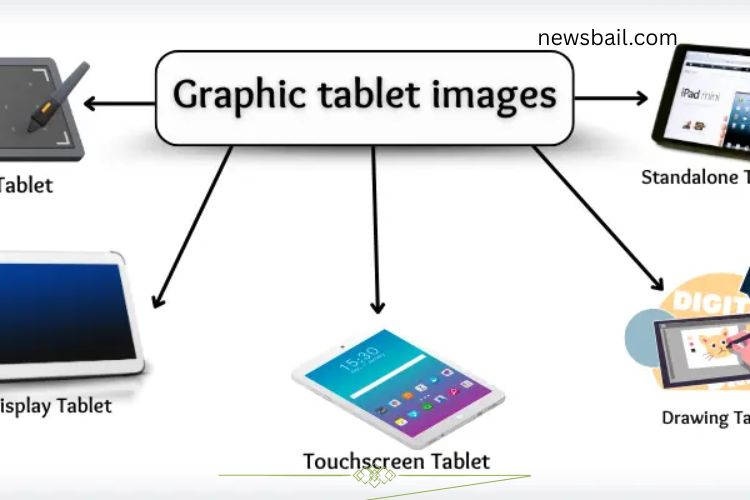
Types of Graphic Tablets
Graphic tablets vary in design and features, catering to both beginners and professionals. Understanding the types helps you choose the right device for your needs:
- Pen Tablet: A basic flat tablet where you draw while looking at your monitor.
- Display Tablet (Pen Display): Lets you draw directly on the screen for a more natural experience.
- Tablet Monitor: A monitor with stylus support for precise drawing and editing.
- Touchscreen Drawing Tablet: Works with both fingers and stylus, similar to a large smartphone.
- Standalone Drawing Tablet: Operates independently without a computer.
- Convertible Tablet: Laptops that fold into tablets, combining productivity and creativity.
- Multimedia Tablet: Lightweight tablets for casual sketching and note-taking.
- Passive Tablet: Stylus works without a battery, ideal for minimal maintenance.
- Active Tablet: Requires a battery for the stylus to interact with the tablet.
- Bluetooth Drawing Tablet: Wireless tablet offering flexibility and portability.
- Digital Art Tablet: Professional-grade tablet designed for high-quality digital artwork.
- Digitizing Tablet: Converts hand-drawn lines into computer input.
Sketching Tablet: Simplified tablet for rough sketches, doodles, and outlines.
Key Features of Graphic Tablets
Modern graphic tablets include features that enhance creativity, speed, and precision:
- High Pressure Sensitivity: Allows fine control over line thickness.
- Battery-Free Stylus: Some pens require no charging.
- Programmable Shortcut Keys: Customize buttons to improve workflow.
- Touch and Gesture Support: Navigate easily with fingers or stylus gestures.
- High Resolution and Large Drawing Area: Provides clear, detailed artwork.
- Pen Tilt Detection: Adds realism to strokes and shading.
- Multi-Device Connectivity: Connect to different devices via USB or wireless.
- Quick Response Time: Ensures smooth drawing without lag.
- Lightweight Design: Easy to carry and ideal for on-the-go creativity.
- Built-in Screen (in some models): View artwork directly as you draw.
- Software Compatibility: Works seamlessly with popular design programs.
Uses of Graphic Tablets
Graphic tablets are versatile tools for creativity, learning, and professional work. They cater to a wide range of applications:
- Digital Drawing: Create detailed illustrations, portraits, and concept art.
- Photo Editing: Retouch images with precision using a stylus.
- Graphic Design: Design logos, posters, and marketing materials.
- Online Teaching: Write and draw live during virtual classes.
- Note-Taking: Record notes digitally, just like on paper.
- 3D Modelling: Shape and sculpt objects for games, films, or design projects.
- Animation: Produce frame-by-frame animated sequences.
- Architectural Design: Sketch floor plans, blueprints, and layouts.
- Handwriting Practice: Students can improve handwriting digitally.
- E-Signatures: Sign documents securely online.
- Game Design: Draw characters, levels, and assets for video games.
- Fashion Design: Create clothing patterns and fabric designs.
- Medical Illustration: Draw body parts for education or presentations.
- Virtual Whiteboarding: Freehand doodles and brainstorming in online meetings.
Advantages of Graphic Tablets
Graphic tablets offer multiple benefits that make them essential for modern creators:
- Simplifies digital drawing and writing.
- Provides natural hand movements and pressure sensitivity.
- Faster and more precise than a mouse for design work.
- Supports online teaching, note-taking, and presentations.
- Eco-friendly by reducing paper usage.
- Compatible with a variety of creative software.
- Lightweight and portable for artists on the go.
- Some models work independently without a computer.
- Improves drawing accuracy and speed.
Disadvantages of Graphic Tablets
While graphic tablets are powerful, they also have some drawbacks:
- Can be expensive for beginners.
- Requires time and practice to master.
- Needs drivers or software installation for proper functioning.
- Not all tablets work seamlessly with every device.
- Drawing surface may feel different from traditional paper.
- Some models require regular charging.
- Limited battery life in wireless tablets.
- Pen tips can wear out over time.
- May not suit every type of user.
- Can be distracting without focus and discipline.
Choosing the Right Graphic Tablet
Selecting the best graphic tablet depends on your goals, experience, and budget:
- Beginners: Choose a simple pen tablet or sketching tablet to learn the basics.
- Intermediate Users: Opt for a display tablet or touchscreen tablet for better control.
- Professional Artists: Invest in high-resolution digital art tablets with full software support.
- Educators & Students: Lightweight tablets with note-taking capabilities are ideal.
- 3D Designers & Animators: Tablets with high pressure sensitivity, tilt detection, and large drawing surfaces work best.
Consider portability, stylus type, pressure sensitivity, connectivity, and software compatibility before making a purchase. The right tablet can boost creativity, efficiency, and overall workflow.
Frequently Asked Questions:
What is a graphic tablet?
A graphic tablet is a digital input device that lets you draw, sketch, or write directly on a flat surface using a stylus. It translates your hand movements into digital art on a computer or tablet screen, offering more precision than a traditional mouse.
How does a graphic tablet work?
The stylus interacts with the tablet’s surface, detecting pressure, movement, and position. The tablet sends this data to your computer, allowing your artwork to appear on the screen in real-time. Some tablets include tilt detection and high pressure sensitivity for realistic strokes.
Who should use a graphic tablet?
Graphic tablets are ideal for digital artists, designers, animators, students, teachers, and anyone who wants to create or edit digital content. They are also helpful for note-taking, e-signatures, and online teaching.
Do I need a computer to use a graphic tablet?
Not all tablets require a computer. Basic pen tablets connect to a computer, while standalone tablets operate independently with their own screen and software.
What software works with graphic tablets?
Graphic tablets are compatible with most design and editing software, such as Photoshop, Illustrator, CorelDRAW, Krita, and many free apps. The software interprets your stylus strokes for precise digital art.
Are graphic tablets suitable for beginners?
Yes! Many tablets are beginner-friendly, with simple setups and intuitive controls. Beginners can start with entry-level tablets before upgrading to professional models with advanced features.
Can I use a graphic tablet for animation?
Absolutely. Graphic tablets are widely used in animation to create frame-by-frame drawings, digital storyboarding, and 3D modeling. The precise control and pressure sensitivity make animation smoother and more accurate.
Conclusion
Graphic tablets have revolutionized the way artists, designers, and creators bring their ideas to life. They combine precision, flexibility, and ease of use, making digital drawing, animation, photo editing, and online teaching more accessible than ever. Whether you’re a beginner exploring your creative side or a professional aiming for detailed digital artwork, a graphic tablet can unlock your full potential. By understanding the types, features, and applications, you can choose the right tablet to match your needs and start creating confidently. Investing in a graphic tablet isn’t just buying a device—it’s stepping into a world of limitless creativity, efficiency, and fun.