A boot sector virus is a dangerous type of malware that infects the boot sector of a storage device. The boot sector contains critical instructions that allow a computer to start and load the operating system. When this area becomes infected, the virus activates before Windows or any antivirus software begins running.
This early execution makes a boot sector virus especially powerful and difficult to remove. It can prevent the system from starting, corrupt important files, damage the Master Boot Record (MBR), and spread to other devices through USB drives or external storage. Because it attacks the startup process itself, it poses a serious threat to system security and data integrity.
Read More: Ultimate Guide to Server Types – Unleash the Perfect Server for Your Needs Today!
History of Boot Sector Viruses
Boot sector viruses played a major role in early computer security threats. Understanding their history helps explain how modern cybersecurity practices evolved.
The First Boot Sector Virus (1986 – Brain Virus)
The first known boot sector virus, Brain, appeared in 1986. It was created in Lahore, Pakistan, by two brothers who originally designed it to prevent software piracy. However, it quickly spread beyond their control.
Brain infected floppy disks and replaced the boot sector with malicious code. Users noticed unusual system behavior and malfunctioning disks. This discovery proved that malware could hide in the boot process, marking the beginning of widespread boot sector attacks.
Spread During the 1980s and 1990s
Throughout the late 1980s and 1990s, boot sector viruses spread rapidly. Floppy disks were widely used to transfer files and boot systems, making them an easy transmission method.
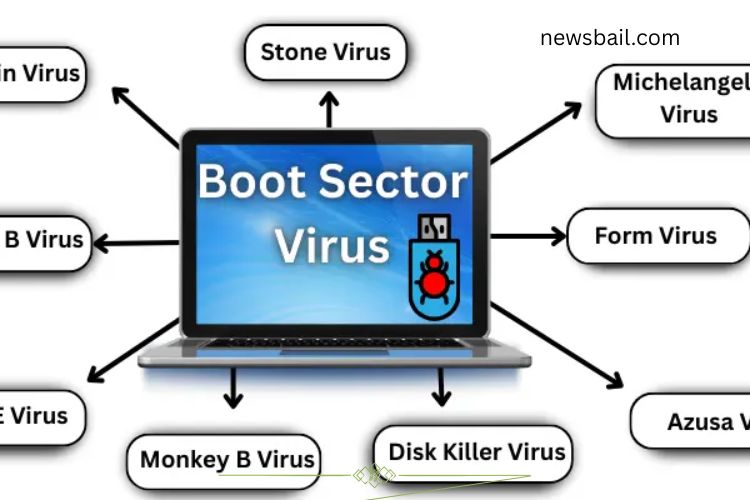
Notable viruses such as Stoned, Michelangelo, and Form became widespread. These infections caused slow startup times, system errors, and complete boot failures. The damage forced businesses and individuals to take computer security more seriously.
How a Boot Sector Virus Works
Boot sector viruses exploit the system startup sequence. By inserting malicious code into the boot area, they gain control before the operating system loads.
Here’s how the infection process typically works:
- Startup Check – When the computer powers on, it reads the boot sector.
- Malicious Code Execution – If infected, the virus loads before the operating system.
- Memory Residency – The virus stays active in system memory.
- Device Infection – It copies itself to connected USB drives or disks.
- Stealth Operation – Because it runs early, detection becomes more difficult.
For example, inserting an infected USB drive and restarting the computer may allow the virus to enter the boot sector. From that moment forward, it executes every time the system starts.
Examples of Famous Boot Sector Viruses
Several boot sector viruses gained attention due to their widespread damage:
Brain Virus
The first boot sector virus, Brain infected floppy disks and disrupted system startup processes in 1986.
Stoned Virus
Stoned displayed random messages and infected both floppy disks and hard drives. It became common in the early 1990s.
Michelangelo Virus
Michelangelo activated annually on March 6 and deleted data from infected systems. Many users lost important files because of it.
Form Virus
Form spread quickly through floppy disks and triggered a beep sound during key presses. Though less destructive, it caused frustration.
Stoned Empire Monkey Virus
This virus altered hard drive partition tables, making data appear lost even when it remained intact.
NYB (New York Boot) Virus
NYB became one of the most reported boot sector viruses of the 1990s, infecting thousands of systems.
AntiEXE Virus
AntiEXE targeted the Master Boot Record and prevented computers from starting properly.
Azusa Virus
Azusa replaced the original boot sector with its own code, making removal extremely challenging.
Disk Killer Virus
Disk Killer proved highly destructive by permanently erasing hard drive data.
Monkey B Virus
Monkey B modified how systems read partitions, causing stored data to appear hidden or inaccessible.
Symptoms of a Boot Sector Virus Infection
Boot sector infections often show clear warning signs. Recognizing these symptoms early can prevent severe damage:
- Slow startup or delayed boot process
- Frequent system crashes
- Error messages during startup
- Missing or corrupted files
- Hard drives or USB devices failing to open
- Repeated beeping sounds during boot
- External drives becoming infected quickly
If multiple symptoms appear, immediate action is necessary.
Detecting a Boot Sector Virus
Detecting boot sector malware requires specialized scanning methods because the infection occurs before the operating system loads.
Effective detection strategies include:
- Running updated antivirus software
- Performing boot-time or offline scans
- Monitoring unusual startup errors
- Checking for MBR corruption
- Scanning external drives before use
Boot-time scans are especially useful because they examine the system before Windows loads, increasing detection accuracy.
Removing a Boot Sector Virus
Removing a boot sector virus can be complex, but following structured steps improves success.
- Recommended Removal Methods
- Use reputable antivirus software with boot scan capabilities.
- Repair or rewrite the Master Boot Record (MBR).
- Disconnect infected external drives immediately.
- Format affected storage devices if necessary.
- Reinstall the operating system in severe cases.
Always back up essential data before attempting major repairs. In advanced infections, professional IT support may be required.
Boot Sector Viruses in Modern Systems
Modern computers offer stronger protection against boot sector attacks. Technologies such as UEFI, Secure Boot, and GPT significantly reduce risk.
UEFI (Unified Extensible Firmware Interface)
UEFI replaces traditional BIOS and includes security improvements that prevent unauthorized boot code from running.
Secure Boot
Secure Boot verifies startup files and blocks untrusted software during the boot process.
GPT (GUID Partition Table)
GPT improves disk structure and security, making boot sector manipulation more difficult.
Despite these advancements, advanced malware still attempts to exploit vulnerabilities. Maintaining updated antivirus protection and system patches remains essential.
Prevention Tips for Boot Sector Virus Protection
Preventing infection is easier than repairing damage. Follow these cybersecurity best practices:
- Keep antivirus software updated
- Avoid using unknown or untrusted USB drives
- Enable Secure Boot in BIOS/UEFI settings
- Perform regular full-system scans
- Back up important files frequently
- Disable automatic booting from external devices
Strong digital hygiene dramatically reduces infection risk.
Frequently Asked Questions:
What is a boot sector virus?
A boot sector virus is a type of malware that infects the boot sector or Master Boot Record (MBR) of a storage device. It activates before the operating system loads, making it difficult to detect and remove.
Why is a boot sector virus considered dangerous?
Boot sector viruses run before antivirus software starts. This early control allows them to damage system files, prevent startup, corrupt data, and spread to other drives without immediate detection.
How does a boot sector virus spread?
Boot sector viruses typically spread through infected USB drives, external hard disks, or older floppy disks. If a computer boots from an infected device, the virus can transfer into the system’s boot area.
Can modern computers still get boot sector viruses?
Modern systems with UEFI and Secure Boot offer stronger protection. However, advanced malware can still target boot-level processes, so updated antivirus software remains essential.
What is the Master Boot Record (MBR)?
The Master Boot Record (MBR) is a small but critical part of a hard drive that controls how the operating system loads. Boot sector viruses often attack or replace this area.
In severe cases, professional technical support may be required.
What was the first boot sector virus?
The first known boot sector virus was Brain, discovered in 1986. It spread through floppy disks and marked the beginning of boot-level malware threats.
Can a boot sector virus permanently damage my data?
Yes. Some boot sector viruses, such as destructive variants from the 1990s, erased hard drive data. Quick detection and removal significantly reduce permanent damage risks.
Conclusion
Boot sector viruses represent one of the most dangerous forms of malware because they attack the very foundation of a computer’s startup process. By infecting the boot sector or Master Boot Record (MBR), these threats gain control before the operating system loads, making them difficult to detect and remove. From the early days of the Brain virus to more advanced boot-level attacks, they have significantly shaped the evolution of cybersecurity.