Computers have become an essential part of our daily lives, but not all computers are built the same. Among the various types, mini computers and microcomputers stand out due to their unique features and uses. While their names may sound similar, these two types differ significantly in size, power, performance, and application. Understanding these differences is crucial for choosing the right computer for your personal, educational, or professional needs.
Read More: Discover the Powerful World of Internet Connections: Essential Types You Must Know
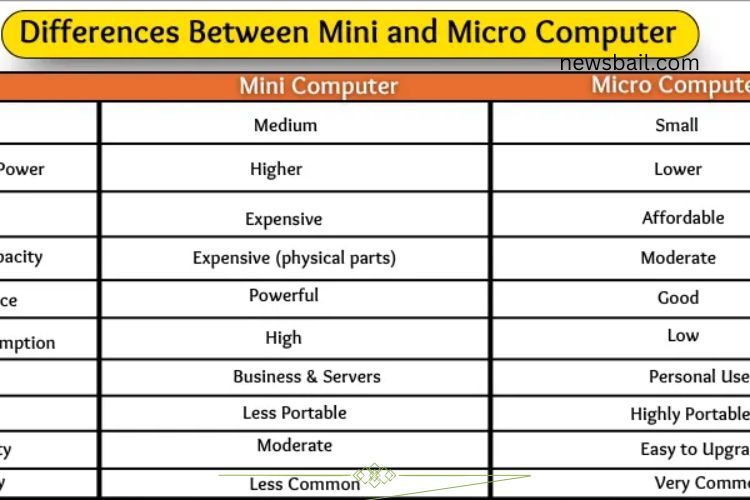
Size Comparison
Size is one of the most noticeable differences between mini and micro computers.
Mini Computers: These computers are relatively larger. They often require a dedicated table, desk, or even a small room. Their design resembles a compact cabinet, making them less suitable for portable use.
Micro Computers: Microcomputers are compact and lightweight. They fit easily on a desk and include devices like laptops, desktops, and even tablets. Their small size allows users to carry them conveniently, making them ideal for students, office workers, and home users.
Processing Power
The processing power of a computer determines how efficiently it can handle multiple tasks and large workloads.
Mini Computers: Mini computers are powerful machines capable of multitasking efficiently. They are designed for businesses and organizations that require high-performance computing for tasks such as scientific calculations, database management, and large-scale processing.
Micro Computers: Microcomputers are suitable for everyday tasks like web browsing, document editing, and media playback. While they are less powerful than mini computers, they provide sufficient performance for personal and educational use.
Price Differences
The cost of mini and micro computers reflects their capabilities and intended use.
Mini Computers: Due to their high performance and larger components, mini computers are expensive. Businesses and industries invest in them for heavy computing needs, making their cost justifiable.
Micro Computers: Microcomputers are more affordable and widely accessible. They are designed for individual use, catering to students, home users, and small office setups. Their lower price makes them a popular choice for personal computing.
Storage Capacity
Storage determines how much data a computer can hold and manage effectively.
Mini Computers: These systems offer significant storage capacity, suitable for large-scale operations. They can handle massive amounts of data simultaneously, making them ideal for businesses and organizations with multiple users.
Micro Computers: Microcomputers offer moderate storage capacity, enough for personal use. They can store documents, media files, and applications but are not designed for heavy multi-user environments.
Performance
Performance encompasses speed, multitasking ability, and overall efficiency.
Mini Computers: Mini computers deliver superior performance. They can run multiple programs simultaneously without slowing down, making them perfect for organizations with high computing demands.
Micro Computers: Microcomputers provide reliable performance for daily tasks. They excel in handling single-user applications but are not suited for intensive workloads or large-scale multitasking.
Power Consumption
Power efficiency is a key consideration, especially for users conscious of energy costs.
Mini Computers: High performance comes with higher energy consumption. Mini computers require more electricity to operate their powerful processors and larger components. They are not energy-efficient compared to microcomputers.
Micro Computers: Microcomputers consume less power due to their compact size and simpler design. They are ideal for energy-conscious users, providing sufficient performance while minimizing electricity usage.
Usage
The intended use of a computer greatly influences whether a mini or micro computer is more appropriate.
Mini Computers: These computers are designed for commercial and scientific environments. They can support multiple users simultaneously and handle complex tasks, making them a preferred choice for organizations, labs, and small companies.
Micro Computers: Microcomputers are geared toward personal and educational use. They are commonly used at home, in schools, and offices for tasks such as typing, gaming, browsing the web, and basic computing.
Portability
Portability determines how easily a computer can be moved and used in different locations.
Mini Computers: Due to their size and weight, mini computers are stationary. They require a dedicated workspace and are typically not moved frequently.
Micro Computers: Portability is a major advantage for microcomputers. Lightweight laptops and tablets can be carried anywhere, making them ideal for mobile professionals, students, and casual users.
Upgradability
Upgradability affects how easily a computer can be improved or customized.
Mini Computers: Mini computers are easier to upgrade. Users can add more memory, replace processors, or enhance storage to boost performance. This flexibility makes them suitable for businesses that need to scale computing power over time.
Micro Computers: Microcomputers have limited upgradability. While desktops allow some upgrades, most laptops and compact models have fixed components, restricting major modifications. Storage and RAM upgrades are usually the only options.
Popularity
The prevalence of mini and micro computers has shifted over time.
Mini Computers: Mini computers were popular in earlier decades for business and scientific applications. Today, their use has declined as more powerful and compact microcomputers dominate the market.
Micro Computers: Microcomputers are ubiquitous today. They are the standard for personal computing and dominate homes, schools, and offices. Their affordability, portability, and ease of use make them the preferred choice for most users.
Frequently Asked Questions:
What is the main difference between mini and micro computers?
Mini computers are larger, more powerful, and designed for multiple users and heavy tasks, while micro computers are smaller, affordable, and meant for personal or educational use.
Which computer is better for business use?
Mini computers are ideal for businesses and organizations that require high performance, multitasking, and data handling for multiple users.
Are micro computers portable?
Yes, micro computers are highly portable. Laptops, tablets, and small desktops can be easily carried and used anywhere, unlike mini computers.
Do mini computers consume more power than micro computers?
Yes, mini computers use more electricity due to their larger components and higher processing power, while micro computers are energy-efficient and designed for personal use.
Can I upgrade a mini computer?
Mini computers are easier to upgrade. Users can enhance memory, processors, and storage, whereas micro computers have limited upgrade options.
Which computer is more affordable?
Micro computers are generally cheaper and suitable for home, school, or personal use, whereas mini computers are more expensive and business-oriented.
What tasks are mini computers best suited for?
Mini computers excel in handling large-scale business operations, scientific calculations, database management, and multitasking for multiple users.
Conclusion
Choosing the right computer depends on your needs, budget, and usage. Mini computers deliver high performance, multitasking capabilities, and large storage, making them ideal for businesses, organizations, and scientific work. In contrast, micro computers offer portability, affordability, and energy efficiency, making them perfect for personal, educational, and light office use. By understanding the key distinctions between mini and micro computers, you can make an informed decision that maximizes productivity, convenience, and value.