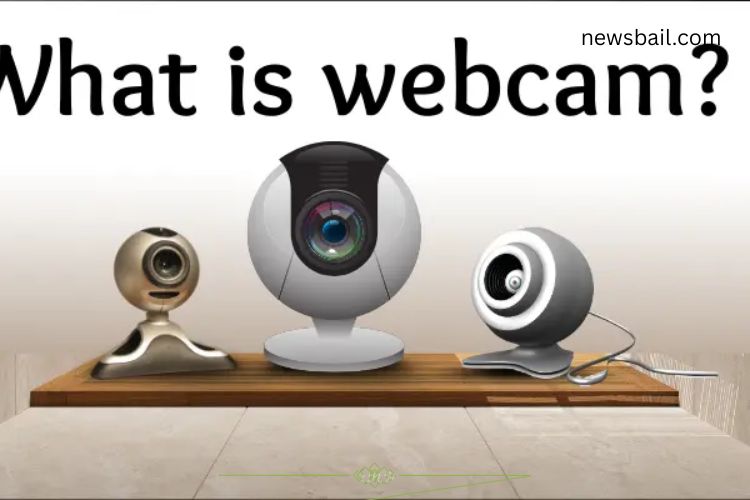
A webcam is a small camera that connects to a computer or laptop, allowing users to capture video and communicate in real-time over the Internet. It enables video calls, online classes, live streaming, and video recording. Webcams can be built into laptops or connected externally via USB. They provide a simple, fun, and effective way to stay connected with people worldwide.
Read More: Master Your Computer: Unlock Confidence and Effortless Tech Skills Today
The History of the Webcam
Webcams have become an essential part of daily life, but their origins are surprisingly modest. The first webcam emerged as a solution to a very specific problem.
The First Webcam
In 1991, a team of scientists at the University of Cambridge created the world’s first webcam. Its purpose? To monitor a coffee pot. By showing whether the pot was full or empty, the webcam saved researchers unnecessary trips to the kitchen. While simple, this innovation marked the beginning of a technology that would revolutionize communication.
Evolution Over Time
Since the 1990s, webcams have undergone massive improvements. Early models were bulky, low-resolution, and required dedicated setups. Today, webcams are compact, often integrated directly into laptops, tablets, and smartphones. Image quality has improved from grainy footage to high-definition (HD) and even 4K resolution. Faster internet speeds now make video calls and live streaming smooth and reliable.
Types of Webcams
Webcams are available in various types to meet different needs:
- Built-in Webcam: Integrated into laptops and monitors, convenient for everyday use.
- External Webcam: Connects via USB and often provides higher quality images and better flexibility.
- IP Webcam (Network Webcam): Operates over a network, ideal for security monitoring.
- Streaming Webcam: Designed for live streaming on platforms like Twitch and YouTube.
- HD Webcam: Offers high-definition video quality for professional communication.
- 4K Webcam: Provides ultra-high-definition video, perfect for content creators and business calls.
- Web Meeting Webcam: Optimized for video conferencing with features like auto-focus and background blur.
How Does a Webcam Work?
Webcams are more than just cameras—they are communication devices that transmit live video over the internet. Here’s how they operate:
Captures Video
The webcam records whatever is in front of it, whether it’s your face, a workspace, or a room.
Sends Video to the Computer
The recorded data is transmitted to your computer, which processes and displays the live video feed.
Shares Video Over the Internet
Once processed, the video is sent online, enabling real-time communication with friends, colleagues, or audiences.
Uses of Webcams
Webcams serve multiple purposes in modern life, ranging from personal communication to professional applications:
- Video Calls: Connect with friends, family, or colleagues face-to-face.
- Online Classes: Facilitate interactive learning for students and teachers.
- Live Streaming: Share videos in real-time on platforms like YouTube, Twitch, and social media.
- Recording Videos: Create content for school, work, or personal projects.
- Photography: Take selfies or quick snapshots.
- Video Conferencing: Essential for remote meetings in professional environments.
- Home Security: Monitor homes and offices remotely to detect intruders.
- Gaming: Stream live gameplay while showing your reactions to viewers.
- Social Media Engagement: Boost interaction by sharing live videos with followers.
- Face Recognition: Use webcams for secure login and device authentication.
Advantages of Using a Webcam
Webcams offer numerous benefits that enhance productivity, learning, and entertainment:
- Enable seamless communication over long distances.
- Support online education and virtual classrooms.
- Allow video recording and content creation.
- Enhance online meetings and professional collaboration.
- Affordable and widely available.
- Built into many laptops for instant use.
- Easy to set up and operate.
- Boost social media engagement with live video content.
- Improve gaming and live streaming experiences.
- Provide face-to-face interaction without physical presence.
Disadvantages of Using a Webcam
Despite their benefits, webcams also come with certain drawbacks:
- Privacy and security concerns, especially with unprotected devices.
- Poor video quality in lower-end models.
- Ineffective in low-light conditions.
- Dependence on a stable internet connection for smooth performance.
- Can cause distraction or anxiety during video calls.
- May be uncomfortable for some users during prolonged use.
- Potential to slow down older computers.
- Compatibility issues with certain devices or software.
- Require regular software updates to maintain optimal performance.
- Limited functionality without an internet connection.
Choosing the Right Webcam
Selecting the right webcam depends on your intended use. Consider these factors:
- Resolution: For casual calls, HD is sufficient; content creators may need 4K.
- Microphone Quality: Built-in microphones work for everyday use, but external mics provide clearer sound.
- Connectivity: USB webcams are versatile, while IP webcams are ideal for security.
- Lighting and Low-Light Performance: Check if the webcam performs well in dim environments.
- Compatibility: Ensure the webcam works with your operating system and software.
Tips for Optimizing Webcam Use
To get the best performance from your webcam, follow these tips:
- Position your webcam at eye level for natural framing.
- Use good lighting to enhance image quality.
- Keep the lens clean to avoid blurry images.
- Test audio and video before important calls.
- Use a stable internet connection to prevent lag.
- Update webcam drivers and software regularly.
The Future of Webcams
Webcams continue to evolve with technology. Artificial intelligence and machine learning are improving facial recognition, background replacement, and low-light performance. Higher resolutions and faster frame rates are making webcams more essential for virtual reality, remote work, and interactive content creation. With constant innovation, webcams are becoming smarter, more versatile, and more integral to digital life.
Frequently Asked Questions:
What is a webcam and how does it work?
A webcam is a small camera that connects to a computer or device, capturing video and audio for live streaming or recording. It records visuals, sends data to your computer, and transmits it over the Internet for others to see and hear in real-time.
What are the different types of webcams?
Webcams come in various types: built-in (laops), external (USB), IP/network cameras, streaming webcams, HD webcams, 4K webcams, and web meeting webcams. Each type serves specific purposes, from casual video calls to professional streaming and security monitoring.
Can I use a webcam for online classes?
Yes! Webcams are widely used in education, allowing teachers and students to interact in real-time during virtual lessons, making learning more engaging and interactive.
How do I improve the video quality of my webcam?
Improve video quality by using good lighting, keeping the lens clean, positioning the camera at eye level, and ensuring a stable internet connection. High-definition or 4K webcams also provide sharper images.
Are webcams safe to use?
Webcams are generally safe, but privacy precautions are important. Avoid leaving webcams uncovered when not in use, use strong passwords, and keep software and drivers updated to prevent unauthorized access.
Can I use a webcam for gaming or live streaming?
Absolutely! Webcams are popular among gamers and content creators for streaming on platforms like Twitch, YouTube, and social media, adding personal interaction with audiences.
Do all webcams have built-in microphones?
Many webcams include built-in microphones, which are sufficient for video calls. For higher audio quality, especially in professional settings, an external microphone is recommended.
Conclusion
Webcams have transformed the way we connect, communicate, and create in today’s digital world. From their humble beginnings monitoring a coffee pot to high-definition cameras embedded in laptops and smartphones, webcams have evolved into essential tools for personal, educational, and professional use. They empower us to share experiences, collaborate remotely, and engage with audiences worldwide. By choosing the right webcam and optimizing its use, anyone can enhance communication, boost productivity, and capture life’s moments with clarity and ease. Webcams are no longer just cameras—they are gateways to connection, creativity, and empowerment.